A shopper who views a product is not a random visitor anymore.
Something caught their attention.
Maybe it was the product image.
Maybe it was the price.
Maybe it was the promise.
Maybe it was the problem the product solves.
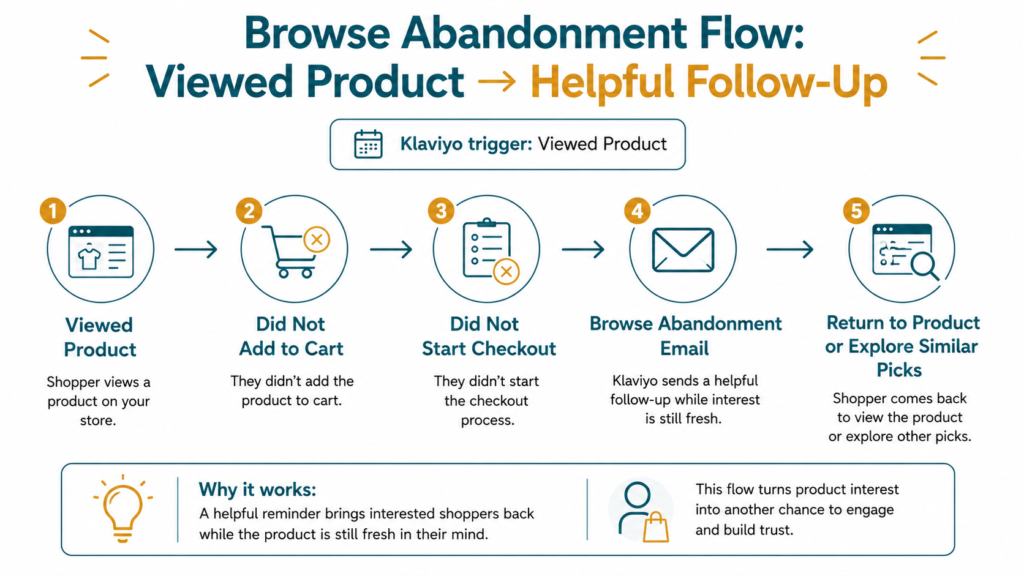
But they did not add it to cart.
They did not start checkout.
They did not buy.
That means they showed interest, but not strong buying intent yet.
And that difference matters.
Because browse abandonment emails should not feel like checkout reminders.
They should feel like a helpful nudge back to something the shopper already looked at.
In Klaviyo, this happens through a browse abandonment flow.
The flow uses product-view behavior to send a relevant follow-up while interest is still fresh.
If you’re still building your automation foundation, start with the 5 Klaviyo email flows every Shopify store should set up first.
Before we talk about timing and sample emails, let’s define the flow clearly. If you’re unsure how a flow differs from a one-off email blast, our guide on email campaigns vs. flows breaks down the difference.
Quick Answer: What Are Browse Abandonment Emails?
In Klaviyo, browse abandonment emails are automated flow emails sent to shoppers who viewed a product but did not take the next step.
For Klaviyo and Shopify, here’s the simple version:
Item | Meaning |
Flow name | Browse Abandonment Flow |
Klaviyo trigger | Viewed Product |
Main audience | Shoppers who viewed a product but did not add to cart, start checkout, or buy |
Main goal | Bring interested shoppers back to the product or a better-fit option |
In Klaviyo, browse abandonment flows are usually triggered by the Viewed Product metric. Klaviyo also notes that this requires Viewed Product tracking to be enabled, and for Shopify, Viewed Product tracking is enabled by Klaviyo’s app embed.
Source: Klaviyo Help Center: How to create a browse abandonment flow
That matters because browse abandonment is not the same as checkout recovery.
The shopper looked.
But they did not commit yet.
So your follow-up should feel softer.
More helpful.
Why Browse Abandonment Emails Matter for Shopify Stores
When I review Shopify email setups in Klaviyo, browse abandonment is one of the flows I check after welcome and abandoned checkout.
Why?
Because product views are buying signals.
Not as strong as checkout.
But still useful.
A shopper viewed something.
That means your product did enough to earn attention.
But attention can disappear quickly.
A Klaviyo browse abandonment flow helps bring that product back into view while interest is still warm.
It can help:
- remind shoppers what they viewed
- explain product value
- answer light hesitation
- recommend similar products
- guide shoppers toward the next step
This is not about chasing every visitor.
It is about using klaviyo email marketing services to follow up with shoppers who already showed product interest.
And when the message is soft enough, it feels helpful instead of pushy.
Why Shoppers View Products But Leave
Shoppers leave product pages for many reasons.
Sometimes the product is not the problem.
The shopper just needs more context.
Possible Reason | What the Email Can Do |
They got distracted | Remind them what they viewed |
They were comparing options | Reinforce product value |
They were not sure it fits | Add sizing, ingredients, use case, or product guidance |
They wanted proof | Add reviews or UGC |
They felt unsure about price | Explain value or show best use case |
They had too many choices | Recommend bestsellers or similar picks |
They were not ready yet | Send a soft reminder without pressure |
The goal is not to push hard.
The goal is to make the product easier to reconsider.
That is why the wording matters.
You do not need to say:
We saw you looking.
You can simply say:
Still thinking about this?
Same idea.
Better feel.
Browse Abandonment vs Added-to-Cart vs Abandoned Checkout
These flows are related, but the intent level is different.
Flow | Klaviyo Trigger | Intent Level | Best Message |
Browse Abandonment | Viewed Product | Lower intent | Helpful product reminder or education |
Added-to-Cart Flow | Added to Cart | Mid intent | Product reminder and value reinforcement |
Abandoned Checkout Flow | Started Checkout | High intent | Checkout reminder, trust, hesitation handling |
Browse abandonment should be softer.
The shopper did not commit yet.
So instead of saying:
Finish your order.
You say something closer to:
Still interested? Here’s why this product may be worth another look.
Klaviyo’s own browse abandonment guidance says a good subject line should be simple, short, and clear, with clarity over cleverness.
Source: Klaviyo Blog: Browse abandonment email trends, tips & examples
That is the tone to aim for.
Clear.
Soft.
Relevant.
If the shopper already started checkout, an abandoned checkout flow is the stronger follow-up to use.
How Many Emails Should a Browse Abandonment Flow Have?
For most Shopify stores, a 2 to 3-email browse abandonment flow in Klaviyo is a strong starting point.
Main Job | |
Email 1 | Reintroduce the product they viewed |
Email 2 | Explain product value or add proof |
Email 3 | Recommend similar products or bestsellers |
I usually keep browse abandonment short because the shopper has not shown checkout-level intent yet.
The goal is to reopen interest.
Not pressure them.
If your product is simple or low consideration, 1 to 2 emails may be enough.
If your product needs education, comparison, sizing, ingredients, or usage context, 3 emails can give you more room.
Now let’s break down what each email should say.
Email 1: Reintroduce the Product They Viewed
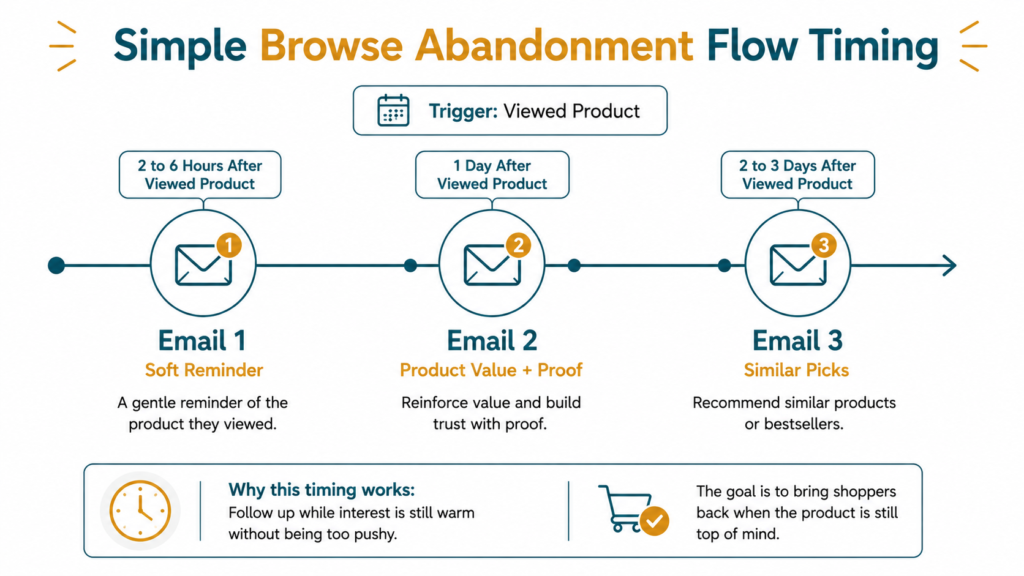
Timing
2 to 6 hours after the Viewed Product event.
Main job
Bring the product back into view while the memory is still fresh.
What to include
- Klaviyo dynamic product block showing the viewed item
- Product image
- Product name
- Price, if it fits your layout
- Short reminder
- CTA back to product page
- Soft body copy
The dynamic product block matters because the email should show the exact product the shopper viewed.
Do not make them remember.
Show the item.
Show the image.
Show the price if it fits your layout.
Make the next click easy.
Element | Recommendation |
Timing | 2 to 6 hours after Viewed Product |
Goal | Remind the shopper what caught their eye |
CTA | View product, take another look, see details |
Sample subject lines
- Still thinking about this?
- A closer look at [Product Name]
- Something caught your eye
- Your recently viewed pick
- Want another look?
The first email should feel light.
The shopper did not start checkout yet.
So the message should bring the product back without acting like they abandoned an order.
Email 2: Explain Product Value or Add Proof
Timing
1 day later.
Main job
Help the shopper understand why the product is worth another look.
What to include
- Klaviyo dynamic product block
- Product benefits
- Reviews or ratings
- UGC if available
- Use cases
- Product education
- CTA back to product page
Element | Recommendation |
Timing | 1 day after Email 1 |
Goal | Build interest and confidence |
CTA | View product, shop now, see why customers love it |
Sample subject lines
- Why customers choose [Product Name]
- See why this one stands out
- Not sure if it’s right for you?
- Here’s what makes it different
- A few reasons to take another look
This email should answer a simple question:
Why should I care about this product?
Show the reason.
Use benefits.
Use proof.
Use a short explanation.
Do not over-explain.
Just make the product easier to understand.
Email 3: Recommend Similar Products or Bestsellers
Timing
2 to 3 days later.
Main job
Give the shopper another way back if the viewed product did not convince them.
What to include
- Similar products
- Bestsellers
- Product category links
- Quiz or buying guide, if available
- Clear CTA
Klaviyo community discussions show that many brands want to show multiple products or recommendations in browse abandonment emails, especially when one viewed product may not be enough.
Source: Klaviyo Community: Browse abandonment flow show multiple products
That makes sense.
Sometimes the viewed product was not wrong.
It just was not the best first pick.
Element | Recommendation |
Timing | 2 to 3 days after Email 2 |
Goal | Help them find a better-fit product |
CTA | Shop similar picks, explore bestsellers, find your fit |
Sample subject lines
- More picks you might like
- Not sure where to start?
- Similar styles worth a look
- Our most-loved picks are here
- Find your first pick
Browse abandonment should help the shopper choose.
It should not make them feel chased.
Should Browse Abandonment Emails Include a Discount?
Usually, I would not lead with a discount in browse abandonment.
Why?
Because the shopper has not shown checkout-level intent yet.
They viewed a product.
That is interest, not commitment.
A discount too early can train shoppers to wait.
Situation | Better Approach |
Shopper viewed once | Send a soft reminder |
Product needs explanation | Add education |
Product has strong reviews | Use social proof |
Shopper viewed a category | Show bestsellers |
Shopper needs help choosing | Send a quiz, guide, or product finder |
Price is a likely concern | Explain value before offering a discount |
A discount can come later in the customer journey if it fits your strategy.
But browse abandonment should usually start with relevance, not urgency.
The first question should not be:
What offer should we give?
It should be:
What does the shopper need to understand before they take another look?
Browse Abandonment Flow Timing Example
These timing examples are starting points, not fixed rules.
Adjust based on your product, price point, buying cycle, traffic volume, and customer behavior.
Suggested Timing | Main Job | |
Email 1 | 2 to 6 hours after Viewed Product | Soft reminder |
Email 2 | 1 day later | Product value and proof |
Email 3 | 2 to 3 days later | Similar products or bestsellers |
A simple product may need a shorter flow.
A higher-consideration product may need more education.
A store with many similar products may need stronger product guidance.
Timing helps.
But like every flow, timing alone will not fix weak messaging.
Sample Browse Abandonment Email Structure
You do not need to make browse abandonment emails complicated.
The structure should be soft, helpful, and product-led.
What did they view?
Why is it worth another look?
What else might fit if that product was not right?
Here’s a simple way to structure each email inside Klaviyo.
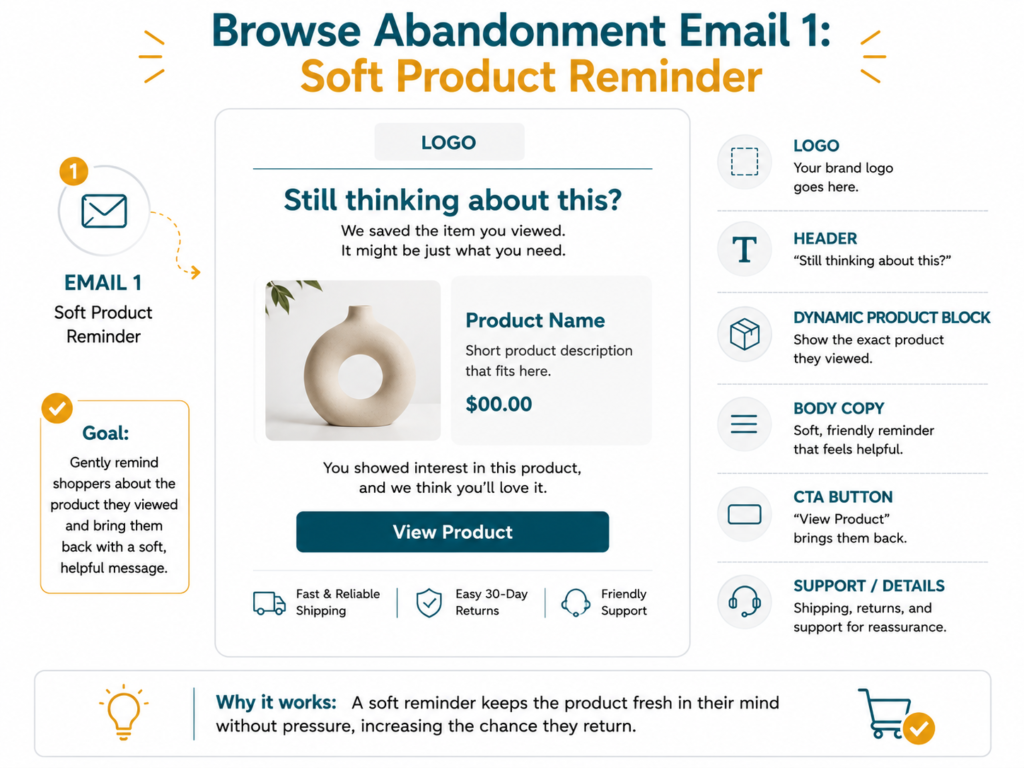
Sample Email 1: Soft Product Reminder
Purpose: Bring the viewed product back while interest is still fresh.
Header:
Still thinking about this?
Dynamic Block:
[Product Image]
[Product Name]
[Price]
Body:
You were checking this out earlier, and it might still be worth another look.
Take a closer look at the details, benefits, and why customers are loving it.
CTA:
View Product
Sample Email 2: Product Value and Proof
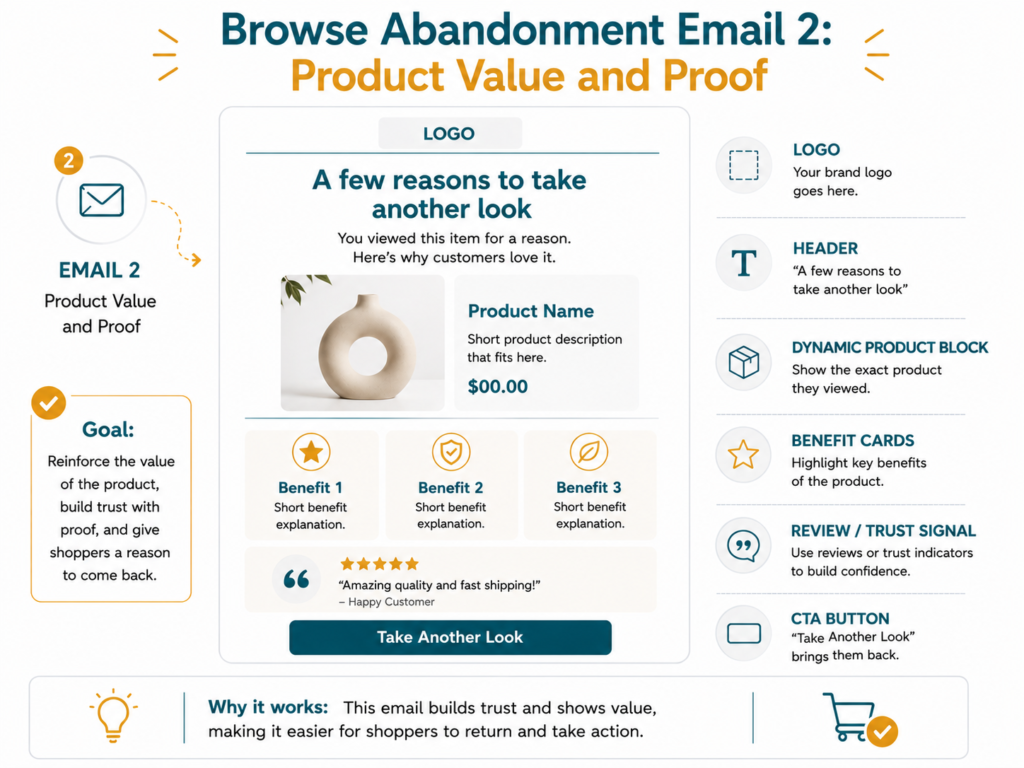
Purpose: Help the shopper understand why the product is worth considering.
Header:
A few reasons to take another look
Dynamic Block:
[Product Image]
[Product Name]
[Price]
Body:
Before you decide, here’s what makes [Product Name] worth another look.
[Benefit 1]
[Benefit 2]
[Benefit 3]
See why this product keeps getting attention.
CTA:
Take Another Look
Sample Email 3: Similar Picks or Bestsellers
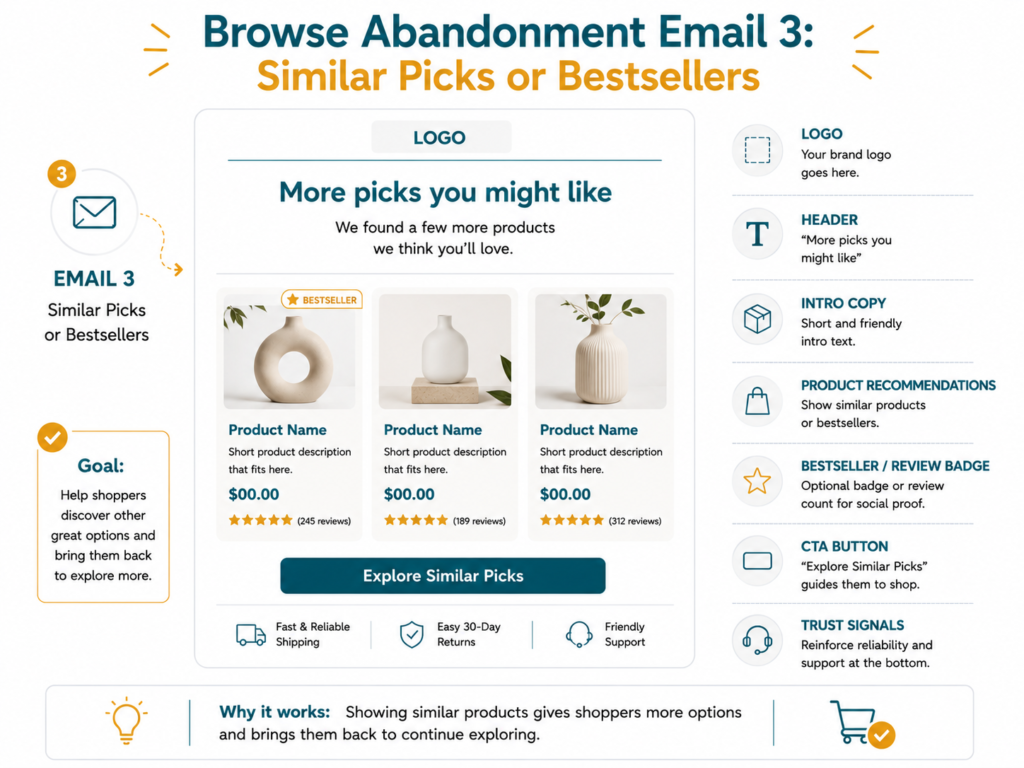
Purpose: Give the shopper another path if the viewed product was not the right fit.
Header:
More picks you might like
Body:
Still looking around?
Here are a few similar picks and customer favorites that may be a better fit for what you need.
Product Recommendations:
[Product 1]
[Product 2]
[Product 3]
CTA:
Explore Similar Picks
These are starting structures, not copy-and-paste templates.
Your browse abandonment emails should still match your product, brand voice, customer hesitation, and the product category the shopper viewed.
Klaviyo Flow Filters and Exclusions to Check
Browse abandonment works best when it does not overlap with higher-intent flows.
In Klaviyo, make sure your browse abandonment flow excludes people who already took a stronger action.
For example:
| Exclusion | Why It Matters |
| Added to Cart | They may need an added-to-cart follow-up instead |
| Started Checkout | They should move into abandoned checkout, not browse abandonment |
| Placed Order | They should not receive browse reminders after buying |
| Already received the flow recently | Prevents the flow from feeling repetitive |
This keeps the message relevant.
A product viewer should not receive the same email as someone who already started checkout.
That is how your Klaviyo flow logic stays clean.
How to Know If Your Browse Abandonment Flow Is Working
A browse abandonment flow being live does not mean it is working.
You need to review whether shoppers are taking the next step.
| Metric | What It Tells You |
| Open rate | Are subject lines getting attention? |
| Click rate | Are shoppers going back to the product? |
| Product page return rate | Are shoppers returning to the viewed product or category? |
| Placed order rate | Are browse abandoners eventually buying? |
| Revenue per recipient | How valuable the flow is per shopper |
| Flow revenue | How much revenue the flow contributes |
| Unsubscribe rate | Does the flow feel too aggressive? |
| Spam complaint rate | Is trust being affected? |
Klaviyo’s flow analytics guide explains that you can review flow message performance using views like the 30-day analytics snapshot, visual canvas, flow message overview report, recipient activity, and link activity tabs.
Source: Klaviyo Help Center: Understanding flow analytics
Open rate is useful.
But for browse abandonment, clicks matter a lot.
You want to know if shoppers are returning to the product, category, or similar recommendations.
To review the numbers properly, you need to know which email marketing metrics every Shopify store should track.
If the numbers are weak, the issue may be message fit, product clarity, timing, or audience rules.
And those can be improved.
Common Browse Abandonment Mistakes to Avoid
| Mistake | Better Approach |
| Treating it like abandoned checkout | Keep the tone softer |
| Sending too many emails | Use a short sequence |
| Being too creepy | Do not overemphasize tracking |
| Leading with a discount | Start with product value |
| Not using a dynamic product block | Show the viewed product |
| Viewed Product tracking is not working | Check that Klaviyo is properly tracking product views |
| Showing irrelevant products | Recommend related or best-fit products |
| No exclusions | Exclude people who added to cart, started checkout, or bought |
| Not reviewing performance | Check clicks, orders, and unsubscribes |
The goal is to make product interest useful without making the shopper uncomfortable.
Do not write like you are watching every move.
Write like you are helping them find their way back.
When Should You Get Help With Browse Abandonment Emails?
You may need help if:
- Shoppers view products but do not take the next step
- Your browse abandonment flow is missing
- Your emails feel too aggressive
- Your Klaviyo dynamic product block is not working
- Your Viewed Product tracking is not working
- You are not sure what to recommend after the viewed product
- Your clicks are low
- Your flow gets unsubscribes
- Your reporting is unclear
When shoppers view products but rarely return, a Klaviyo email marketing agency can help improve your targeting, flow timing, product messaging, and follow-up strategy.
Because browse abandonment is not about chasing people.
It is about giving interested shoppers a helpful reason to take another look.
Final Thoughts
Browse abandonment emails help bring back shoppers who viewed products but did not take the next step.
They were interested.
Just not ready yet.
That means your follow-up should be softer, helpful, and product-led.
Start simple.
Show the product they viewed.
Explain why it is worth another look.
Add proof.
Recommend similar products if needed.
Keep the CTA clear.
Use Klaviyo exclusions so the right shoppers get the right flow.
That is how browse abandonment emails bring interested shoppers back.
At Your Proactive Media, we help Shopify brands build effective Klaviyo browse abandonment flows that re-engage interested shoppers, increase product returns, and drive more conversions.
Want to Bring More Product Viewers Back?
If shoppers are viewing products but not moving toward cart or checkout, your browse abandonment flow may need a closer look.
FAQs About Browse Abandonment Emails
What are browse abandonment emails?
+Browse abandonment emails are automated Klaviyo flow emails sent to shoppers who viewed a product but did not add to cart, start checkout, or buy.
What triggers a browse abandonment flow in Klaviyo?
+In Klaviyo, browse abandonment is usually triggered by a Viewed Product event.
Is browse abandonment the same as abandoned checkout?
+No. Browse abandonment happens after someone views a product. Abandoned checkout happens after someone starts checkout but does not place an order.
How many browse abandonment emails should I send?
+Most Shopify stores can start with 2 to 3 emails.
Should browse abandonment emails include a discount?
+Usually, no. Start with a product reminder, product value, proof, and similar recommendations before considering an incentive.
What should browse abandonment emails include?
+They should include the viewed product, Klaviyo dynamic product block, product value, reviews or proof, similar products, and a clear CTA.
How do I know if browse abandonment emails are working?
+Track click rate, product page return rate, placed order rate, revenue per recipient, flow revenue, unsubscribe rate, and spam complaint rate.

Jasmin Umali
Jasmin Umali is the Founder of Your Proactive Media and a Klaviyo email marketing strategist with 6 years of experience helping ecommerce brands generate an additional 20%–30% or more revenue through email marketing.